
BT Mail Spam Filter Not Working [Resolved]
- 1
![BT Mail Spam Filter Not Working [Resolved]](https://helpemailtales.com/upload/blog/68d25fe901f84_bt-mail-spam-filter-not-working-resolved-.webp)
Every morning, whenever you open your BT mailbox, you see a large pile of junk emails. These often include fake invoices, suspicious promotions, and many unwanted messages. Over time, it may feel like your inbox has turned into a digital trash bin, which can be quite worrying.
You may have tried manually deleting these emails or adjusting the spam settings, but the junk still keeps coming. This can feel stressful, leaving you wondering what to do next. Don’t worry - we have the best solution to fix the BT Mail spam filter not working issue. By applying a few simple steps, you can get everything back under control. But before we move into the actual troubleshooting, let’s first go over some important preparations.
Preparations Before Troubleshooting
Before you begin the troubleshooting process for a BT Mail spam filter not working problem, you must be prepared with the following:
Check Devices
Check if the issue happens on one device or multiple devices, like a laptop, phone, or tablet. If only one device is affected, it may be a local setting issue. If all devices are affected, the problem is likely with your BT Mail account or spam filter system.
Note Recent Changes
Have you made any recent changes to your email settings? This could include changing email settings, updating your device’s OS or BT Mail app, or installing new browser extensions. If so, then that may also affect the spam filtering system.
Check Security Software
The antivirus or third-party email protection software in your system may have its own spam filtering rules that conflict with BT Mail's system. Check if your security software is redirecting or quarantining emails. Also, check if you have activated spam protection features that might be overriding BT Mail’s filters.
Know BT Mail Support Options
You must also know where you can get help if you need it before you start troubleshooting. BT Mail provides many support options, like the BT Help Website, which includes Guides, FAQs, and service status updates, and the BT Community Forums, where you can ask other users if they are facing the same problem. You can also contact BT Mail support through live chat or phone.
Review Spam Folder
It is important to review how your spam folder is working. You must know if legitimate emails are wrongly flagged as spam or if the spam mail is showing in your inbox rather than the spam folder. Pay attention to whether spam emails are coming from a particular sender or domain frequently.
Possible Issues When Fixing BT Mail Spam Filter Not Working
When you fix the BT Mail spam filter not working issue, many problems can arise. These can be:
-
BT Mail system delays or errors
-
Whitelist or blocklist misconfiguration
-
Phishing or spoofed emails bypass the filter
-
BT Mail account compromise
Steps to Resolve BT Mail Spam Filter Not Working Issue
Here are all the essential steps to follow to properly resolve the BT Mail spam filter not working issue:
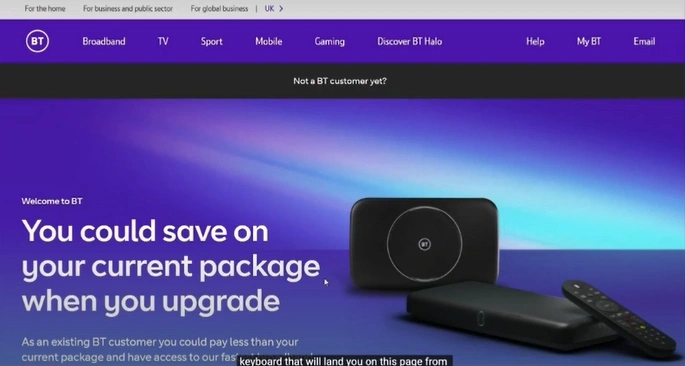
Step 1: Open your browser and visit the BT official website.
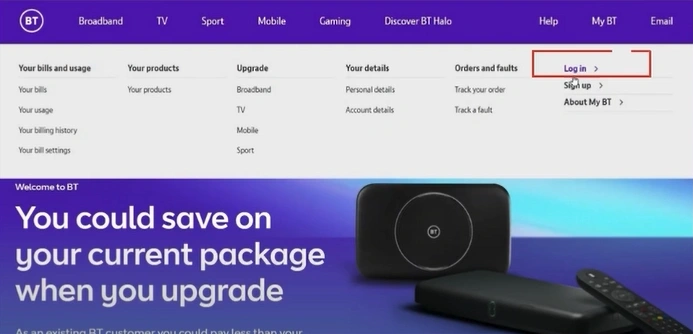
Step 2: Click on My BT on the top menu bar, then click on the Log in option.
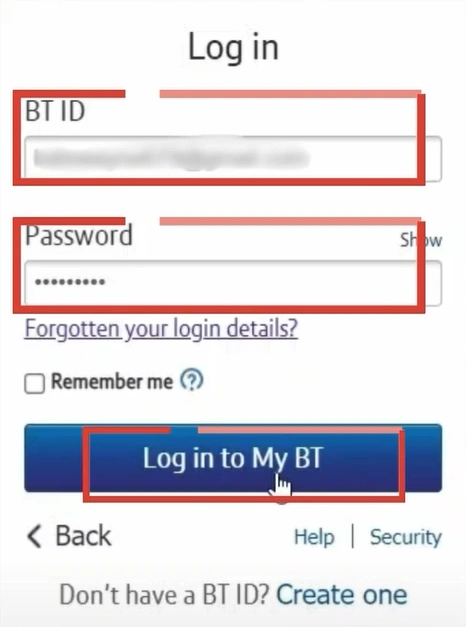
Step 3: Enter your BT ID and password to log in to your BTinternet account.
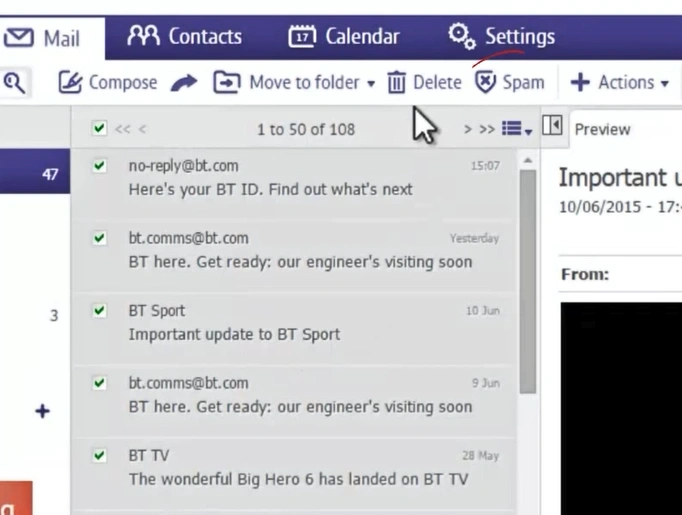
Step 4: Select the emails you want to mark as spam.
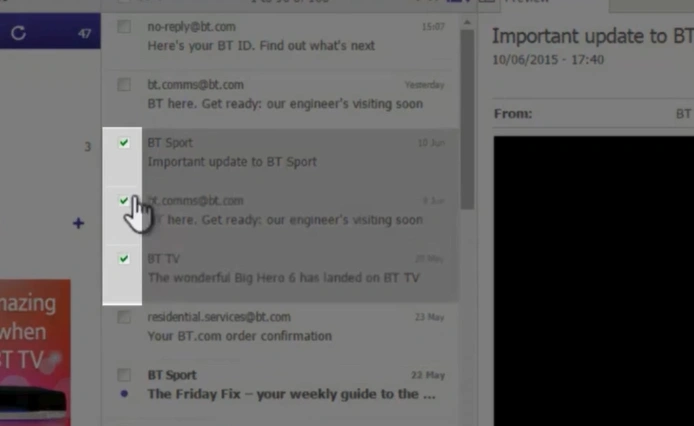
Step 5: Click on the Spam option in the top bar.
Also Read:- How to Do BTinternet Email POP3 Settings?
Wrap Up
Here, we conclude the troubleshooting steps to fix the issue with your BT Mail spam filtering system. The above method can help clean your inbox and give you back full control.
Also, don’t forget to check the affected devices, review the support options provided by BT Mail, and monitor the behavior of the spam folder. Keep in mind that some issues may still come up while fixing the BT Mail spam filter problem, so addressing them will ensure a smoother process.



 +1-857-557-6896
 +44-161-791-4592